

Rematch Journal
Rematch adds a few new features when integrated with the journal:
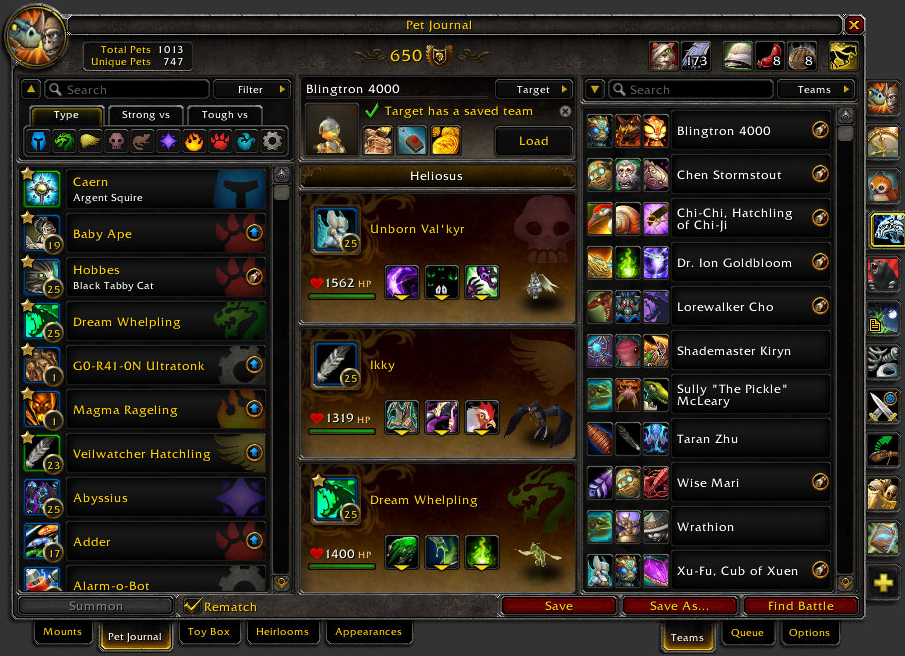


Extended Column
The most notable change Rematch makes to the journal is a "third panel" that contains the Teams, Queue and Options panels. You'll read more about those later in the guide. Tabs at the bottom will switch between the extended panels.
Target Panel
In place of the pet information panel, Rematch uses this space to show your most recent target and their pets if they have any. You can also choose any noteworthy target from the Target button at the top of the panel.
Type Bar
A pullout panel at the top of the pet list allows you to quickly filter for a particular pet type, or to quickly find counters with Strong Vs and Tough Vs filters.
Save Buttons
The Save button will save your currently loaded pets to the currently loaded team. Save As will prompt for a name and target to save as a new team.
Total Count Button
The total pets you own now also displays the unique pets you own. This is how many you have without duplicates. This is now a button too. Click it to view some stats about your collection.
More Action Buttons
In addition to the Revive Battle Pets button, Rematch adds buttons for bandages, both pet treats, safari hat, and a summon random favorite pet button. The latter can be used to dismiss a pet too.
Turning Journal Integration Off/On
Rematch tries its best to play nicely with all other addons. But occasionally you may need to turn off Rematch's journal integration to get at other addons on the journal. You can do that by unchecking Rematch beside the Summon button. The checkbox will remain to turn Rematch back on when ready.