Queue
Half the battle of pet battles is leveling your pets. Rematch has a robust system to make this easy; with a place to store all pets you want to level, a way to mark a slot on a team for leveling pets, and preferences to make the addon intelligently choose which pet to level.
Leveling Slot
The most effective way to level a pet is to have max level pets carry it. The max level pets can beat higher level opponents and all xp is rewarded to the leveling pet.
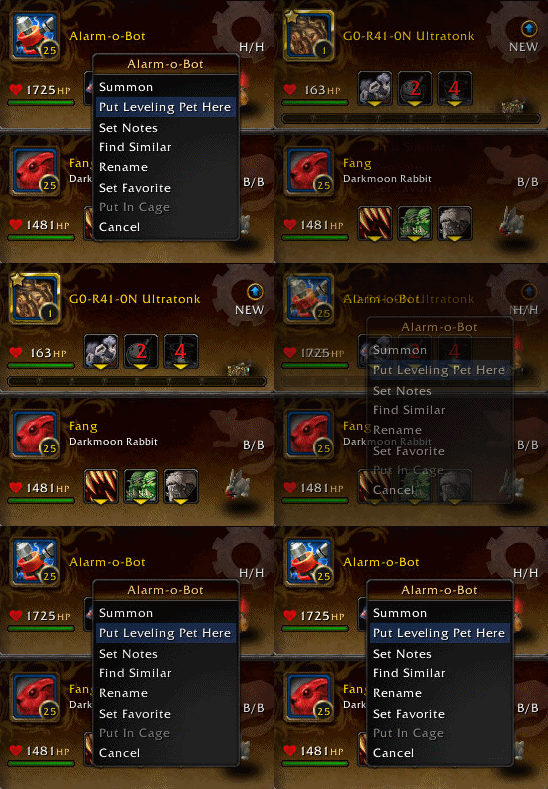
To use Rematch's leveling system, designate a leveling slot by right-clicking a slot and choose Put Leveling Pet Here.
If you have any pets in the leveling queue, the top-most pet will be pulled from the queue and slotted in this slot.
Slots with a gold border like the one pictured here for G0-R41-0N Ultratonk mean it is under the leveling queue's control.
If a slot has a silver border, it means it's under the queue's control but there are no pets in the queue.

When a team is saved with a leveling slot, a special icon in the team will mark it as leveling slot. Anytime these teams are loaded, the queue will fill these slots with the current leveling pet.
Leveling Queue
The leveling queue is the heart of the leveling system in Rematch and has its own panel that closely mirrors the pet list. Drag pets you want to level into the queue and rearrange them in the order that you'd like them to level.
If any leveling slots are defined, such as from a saved team that you're loading, the queue will fetch the top-most pets to fill those slots. When a pet in the queue reaches level 25 (gratz!) the pet is automatically removed from the queue and the next pet will take its place.
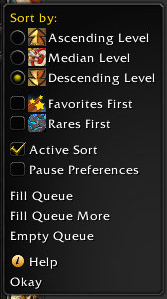
To manage the queue there is a Queue button at the top of the panel. It will pull out this menu.
- Sort by Ascending Level will order pets from lowest to highest level.
- Sort by Median Level will order pets closest to level 10.5. (Level 10 and 11 pets gain the most xp from most level 25 tamers.)
- Sort by Descending Level will order pets from highest to lowest level.
- Favorites First will group your favorite pets to the top of the queue so they level first.
- Rares First will group rare-quality pets to the top of the queue so they level first. Uncommon and lesser pets are sorted by level without regard to rarity.
- Pause Preferences will suspend all preferences, which is discussed a little later.
- Fill Queue will fill the queue from your filtered pet list. It will choose one of each pet that doesn't have a level 25 version (or a version already in the queue). If you'd like to fill with only rares, filter the pet list to show only rares and this option will only pull pets from the filtered list.
- Fill Queue More will also fill the queue but it will also bring over pets that have a 25 version or one already in the queue.
- Empty Queue will empty the queue of pets. A confirmation popup will appear to confirm you really want to remove all pets from the queue.
Active Sort
Active Sort is another option in the menu but it deserves more detail.
Rematch assumes the order of pets in the queue is the order you want them to level. Even after you've chosen one of the sort options (Ascending, Favorites First, etc), Rematch will not mess with that order on its own...unless Active Sort is enabled.
With Active Sort, you are effectively telling Rematch you do not want to be in charge of that order and you'd like Rematch to handle it. Rematch will diligently keep the queue sorted in either Ascending, Median or Descending order. As pets gain xp, they may change position in the queue and Rematch will automatically swap in the new top-most pet in the queue.
This is a very powerful feature when you want to bring up many low levels so they can survive harder fights, or you want to finish off your pets closest to 25, or if you want to maximize the xp from doing a round of level 25 tamers.
While Active Sort is enabled, you cannot manually change the order of pets in the queue. Attempting to do so will show a popup asking if you'd like the disable Active Sort. You can also manually disable Active Sort by unchecking it from the above queue menu.
Leveling Preferences
Preferences are a way to "program" more control into the leveling queue. If a leveling pet is expected to take some damage you may want the queue to choose pets with some minimal health. If a tamer is exceptionally good for low level pets, you may want to favor those when it comes time to battle.
Leveling preferences can be defined for a team or for an entire team tab. Right click a team or its tab and choose Leveling Preferences to bring up a dialog like this:
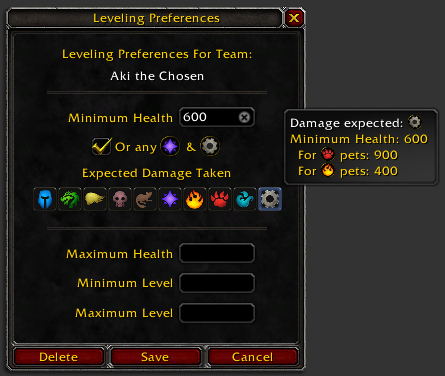
The Minimum Health is probably be the most common preference. This value makes the queue prefer pets with at least this much health. In the above example it's 600 health. When the queue goes to pull a pet from the queue, it will skip over any with less than 600 health. In the event no pet meets the preferences, it will pull from the top of the queue as always.
The Or any [Magic] & [Mechanical] option handles the racial abilities of these two pets to survive one attack that would kill any other pet type.
Expected Damage allows the adjustment of the minimum health for finer precision. In the above tooltip for the Mechanical expected damage, the queue would adjust the minimum health to 900 for Beast pets and 400 for Elemental pets, to account for their vulnerability or resilience to Mechanical damage.
The other settings (Maximum Health, Minimum Level and Maximum Level) are self explanatory.
While a preference is active, pets that fail to meet the criteria are dimmed in the queue. When the queue selects a pet to slot, it will skip over these dimmed pets if there are any that meet the preferences' criteria.

